Calculating your GPA at Arizona State University has never been easier with our ASU GPA Calculator. Designed for Sun Devil students, this Arizona State University GPA Calculator helps you accurately compute your semester or cumulative GPA by simply entering your courses, credit hours, and grades. Understanding the ASU Grading System, including plus/minus distinctions and credit weight, is essential for precise results. Whether you’re planning for Dean’s List, scholarships, or graduation honors, this calculator provides instant, reliable results while eliminating manual errors. Track your academic progress, explore grade scenarios, and make informed decisions to achieve your best performance at ASU.
ASU Grading System Overview
Arizona State University uses a detailed grading system with plus/minus designations that form the foundation of GPA calculations. Understanding this system is essential for accurately assessing your performance and planning courses strategically.
ASU Grade Points
| Grade | Grade Points |
|---|---|
| A+ | 4 |
| A | 4 |
| A- | 3.7 |
| B+ | 3.3 |
| B | 3 |
| B- | 2.7 |
| C+ | 2.3 |
| C | 2 |
| D | 1 |
| E | 0 |
Note: ASU uses "E" instead of "F" for failing grades. Plus/minus designations are only used for some grades. Both A+ and A carry 4.0 points, rewarding exceptional performance without inflating GPA.
Non-GPA Grades
- P (Pass)
- NP (No Pass)
- I (Incomplete)
- W (Withdrawal)
- AU (Audit)
- Y (Satisfactory)
These grades appear on transcripts but do not affect GPA. They allow students to explore courses without GPA risk or meet degree requirements under alternative grading systems.
Credit Hours
Each course’s credit hours determine its weight in GPA calculation. Most courses carry 3 credits, but labs, internships, and seminars may carry 1–6 credits. Higher-credit courses have greater impact on GPA, so focus on performance in these courses for a stronger academic record.
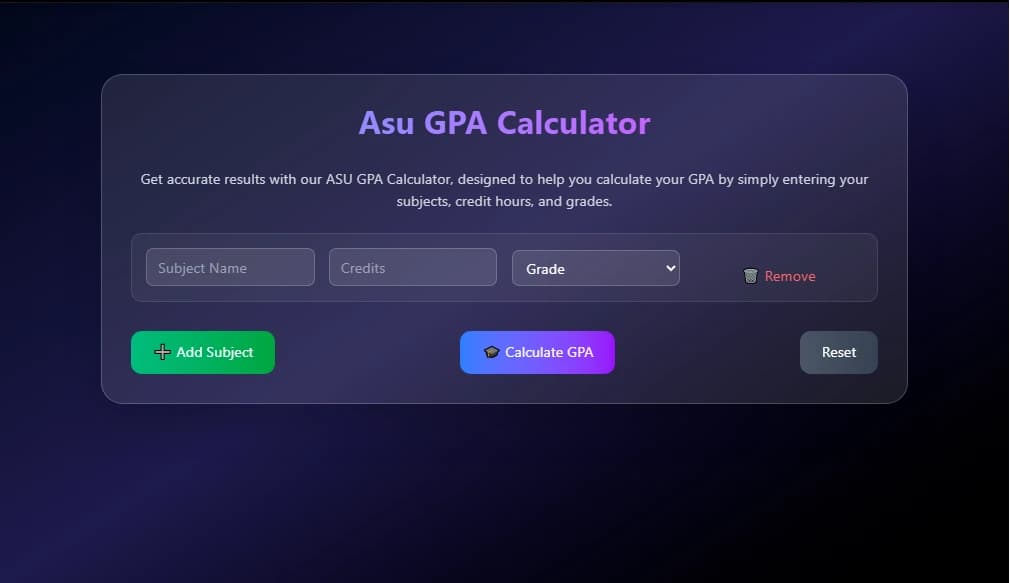
How to Use the ASU GPA Calculator
- Enter Subject Name:
Input the subject name.
- Add Credit Hours:
Enter the exact credit hours as per ASU records.
- Select Grade:
Choose your grade accurately, including plus/minus distinctions.
- Calculate GPA:
Click "Calculate" to see instant GPA results.
- Save & Track:
Keep a record of GPA calculations for multiple semesters.
ASU GPA Calculation Example
| Course | Grade | Credits | Quality Points |
|---|---|---|---|
| ENG 101 | A (4.0) | 3 | 12.0 |
| MAT 170 | B+ (3.3) | 4 | 13.2 |
| BIO 181 | A- (3.7) | 4 | 14.8 |
| HST 109 | B (3.0) | 3 | 9.0 |
Total Quality Points: 49.0 ÷ 14 credit hours = 3.50 GPA
This weighted formula ensures high-credit courses impact your GPA proportionally, providing a true reflection of academic performance.
Advanced GPA Planning at ASU
Maximizing your academic performance at Arizona State University requires more than just earning good grades—it involves strategic GPA planning. Understanding how course credits, grade trends, and university policies interact can help you make informed decisions that boost your cumulative GPA. Using the ASU GPA Calculator, you can simulate different grade scenarios, track progress across semesters, and identify courses that have the greatest impact on your GPA. This proactive approach allows Sun Devil students to plan effectively for scholarships, honors, and career opportunities.
How High-Credit Courses Affect Your GPA
At ASU, courses with higher credit hours carry more weight in your GPA calculation. For example, a 4–5 credit core course contributes more quality points than a 1–3 credit elective. Excelling in these high-credit courses can significantly raise your cumulative GPA, while lower performance can have a larger negative impact. By using the ASU GPA Calculator, you can see exactly how each high-credit course influences your GPA, enabling smarter course planning and prioritization.
Retaking Courses to Improve Your GPA
The ASU grade replacement policy allows students to retake eligible courses to improve their GPA. When a course is retaken, the higher grade can replace the previous one in GPA calculations, giving students an opportunity to recover from earlier low scores. Using the Arizona State University GPA Calculator, you can experiment with potential retake scenarios to see the resulting effect on your cumulative GPA, helping you plan your academic strategy more effectively.
Planning for Dean’s List or Graduation Honors
Achieving Dean’s List or graduating with honors requires careful monitoring of your semester and cumulative GPA. By projecting grades for upcoming courses with the ASU GPA Calculator, you can identify which courses to focus on and set realistic GPA targets. This strategic planning helps you allocate study time efficiently and make decisions that maximize your chances of reaching academic milestones recognized by Arizona State University.
Using GPA Trends to Select Electives
Analyzing your GPA trends over previous semesters can inform smarter elective choices. If certain types of courses consistently result in higher grades, selecting similar electives can boost your overall performance. Understanding the ASU Grading System and how grade points are weighted allows you to interpret trends accurately and optimize your course schedule. Integrating this insight with the ASU GPA Calculator ensures that your academic planning aligns with your long-term goals.
Benefits for ASU Students
- ⚡
Time Savings
Calculate complex GPAs in minutes instead of hours manually.
- 🎯
Accurate Planning
Plan semesters with precise GPA projections and scenarios.
- 📈
Trend Analysis
Track GPA history and spot patterns for continuous improvement.
- Save time with instant, accurate GPA calculations.
- Experiment with grade scenarios to meet Dean's List or scholarship targets.
- Monitor trends to make informed academic decisions throughout your ASU career.
- Handle ASU’s unique grading nuances accurately, including E grades and plus/minus distinctions.
Related Academic Calculation Tools
SGPA Calculator
Comprehensive SGPA calculation tool for accurate sgpa calculator.
Try SGPA Calculator →Cgpa to GPA
Convert CGPA TO GPA fast and accurately in seconds free and instantly.
CGPA TO GPA Calculator →Tips to Improve Your GPA at ASU
🌟 Sun Devil Success Strategies
- Prioritize high-credit courses that impact your GPA the most
- Understand ASU's grade replacement and course retake policies
- Target Dean's List and graduation honors requirements
- Leverage tutoring, Supplemental Instruction, and academic support services
- Balance challenging major courses with manageable electives
- Use office hours and study groups for difficult subjects
- High-credit courses (4–5 credits) have greater GPA impact; focus your study efforts accordingly.
- Retake eligible courses strategically to improve cumulative GPA.
- Achieve Dean's List (3.5+ GPA) by understanding minimum credit load requirements.
- Utilize ASU's academic resources for better understanding and higher grades in key courses.
Conclusion
The ASU GPA Calculator streamlines GPA calculations while aligning with the official ASU Grading System. By using this Arizona State University GPA Calculator, students save time, avoid calculation mistakes, and gain clear insights into their academic performance. Regular use helps monitor trends, plan course selection strategically, and aim for scholarships or honors. With accurate, instant results, this tool empowers Sun Devil students to make confident academic decisions throughout their university journey.
FAQs – ASU GPA Calculator
1. What is the ASU GPA Calculator?
The GPA Calculator ASU is an online tool that helps Arizona State University students calculate their semester or cumulative GPA quickly and accurately using the ASU Grading System.
2. How do I use the Arizona State University GPA Calculator?
Enter your courses, credit hours, and grades into the Arizona State University GPA Calculator, then click calculate. The tool accounts for plus/minus grades and credit weighting for precise results.
3. What grading scale does ASU use?
ASU follows a detailed ASU Grading System with grades from A+ to E, including plus/minus distinctions. Non-GPA grades like P, NP, I, or W do not affect your GPA.
4. Can the ASU GPA Calculator handle multiple semesters?
Yes, the calculator supports cumulative GPA calculations across multiple semesters, helping students track academic progress throughout their Arizona State University journey.
5. Do Pass/Fail or Incomplete courses affect my GPA at ASU?
No. Courses marked P, NP, I, W, AU, or Y are recorded on transcripts but excluded from GPA calculations in the ASU Grading System.
6. Can I use this tool to plan for scholarships or Dean’s List?
Absolutely! By experimenting with different grades and credit hours, students can project GPA outcomes and strategize to meet Dean’s List, honors, or scholarship requirements.
7. Is the ASU GPA Calculator mobile-friendly?
Yes, this Arizona State University GPA Calculator works seamlessly on smartphones, tablets, and desktops for on-the-go GPA tracking.
8. How accurate is the ASU GPA Calculator?
The calculator strictly follows the official ASU Grading System, ensuring precise GPA calculations while reducing errors compared to manual methods.